Text messages
Text message program
Last updated August 2026
Session reminders and updates for sessions you booked. Optional, and free to leave.
What these messages are
Next Play is the booking platform your trainer uses. When you book a session through it, you can choose to get text messages about that session.
Next Play sends every message. Each one names the trainer's business the session belongs to. These are messages about sessions you booked, not marketing.
How to opt in
There is one way to join, and it happens while you are booking:
- Open your trainer's page on onnextplay.com and choose a session.
- Sign in or create an account.
- Continue to the review step, the last screen before payment.
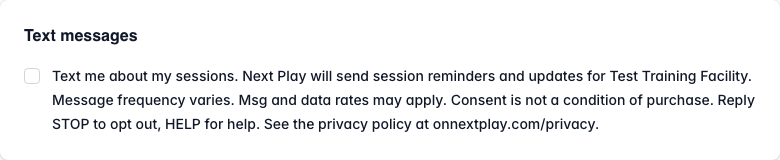
- Tick the box labelled with the wording quoted below. It is never ticked for you.
- Complete the booking.
Your booking completes whether or not you tick the box. Agreeing to texts is not a condition of buying anything.
The exact wording you agree to
“Text me about my sessions. Next Play will send session reminders and updates for your trainer's business. Message frequency varies. Msg and data rates may apply. Consent is not a condition of purchase. Reply STOP to opt out, HELP for help. See the privacy policy at onnextplay.com/privacy.”
When you tick it, we store that wording, the date and time, your IP address, and which trainer's business it applies to, so we can show what you agreed to. Consent covers that one trainer and is not shared with any other trainer on the platform.
How often we text and what it costs
Message frequency varies. It depends on how many sessions you book and whether any of them change.
Next Play does not charge for text messages. Message and data rates may apply from your mobile carrier.
How to stop
Reply STOP to any message and we stop texting you. It takes effect immediately and you will get one confirmation, then nothing further.
These words all work: STOP, STOPALL, UNSUBSCRIBE, CANCEL, END, QUIT.
Reply START to turn messages back on.
How to get help
Reply HELP or INFO to any message for support information.
You can also write to help@onnextplay.com.
What our messages look like
Real examples of the four kinds of message we send:
- Next Play: Reminder: Saturday Skills Camp starts at 6:00 PM with LGTI Fit. Reply STOP to opt out.
- Next Play: You're off the waitlist for Saturday Skills Camp! Claim your spot by 6:00 PM. Reply STOP to opt out.
- Next Play: LGTI Fit has moved tonight's session to 7:00 PM, same location. Reply STOP to opt out.
- Next Play: Your waitlist spot for Saturday Skills Camp has expired. Reply STOP to opt out.
Our messages never contain links.
Privacy and terms
How we handle your information, including your mobile number and your consent record, is covered in the privacy policy at onnextplay.com/privacy. We do not share or sell mobile opt-in information or consent records to anyone for marketing purposes.
The terms covering your use of Next Play are at onnextplay.com/terms.
Next Play is a service of LeadBoost, LLC.