Paying for sessions
What checkout looks like, what the fees are, and how to cancel.
Updated August 17, 2026
When a session has a price, you pay at the moment you book. Here is what to
expect.
What you see at checkout
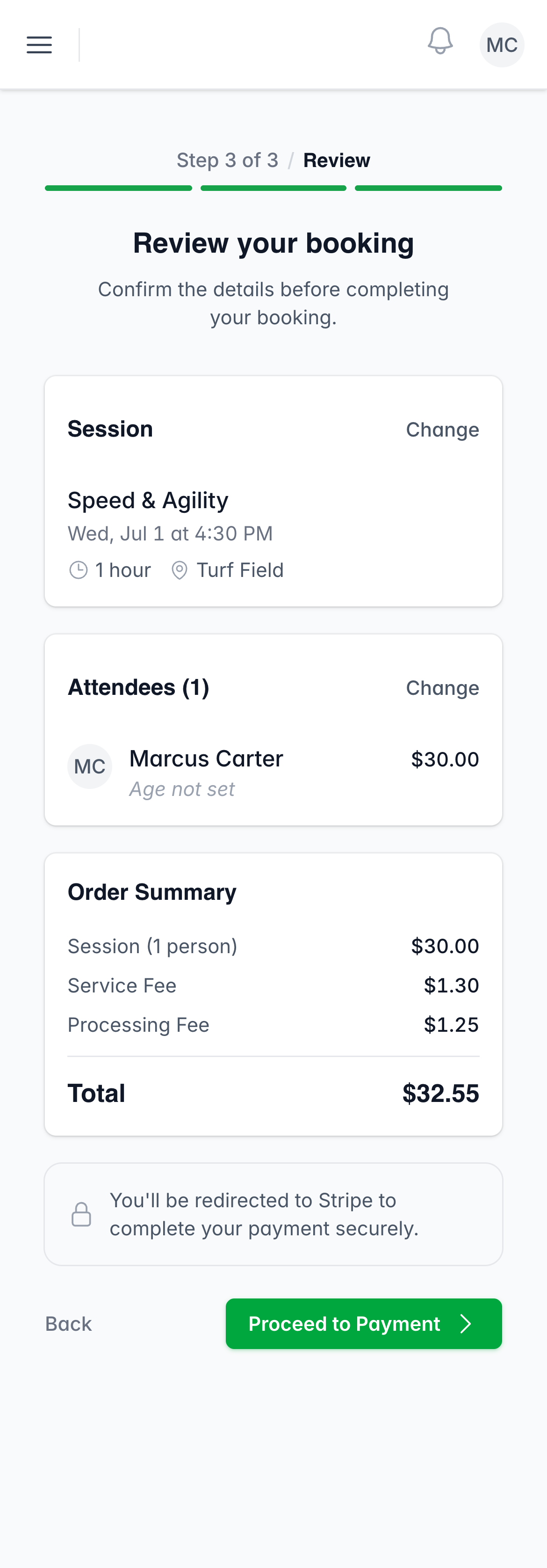
The review screen shows a clear breakdown before you pay:
- The session price, per person
- Any add-ons you chose
- A “Service Fee” line
- A “Processing Fee” line, if your trainer passes card fees on
Tap Proceed to Payment to pay by card through Stripe. Your card details go
straight to Stripe and are not stored by Next Play.
Free sessions
If a session is free, there is no payment step. You tap Complete Booking and
your spot is confirmed right away.
Receipts
Stripe emails you a receipt as soon as your payment goes through. There is
nothing extra to download in the app.
Cancelling a booking
Open the booking under My Bookings and tap Cancel Booking. You can cancel
a confirmed booking any time before the session starts.
Refunds
Refunds are handled by your trainer, not from your account. If you need one,
message your trainer and they can issue it from their side.
Was this helpful?