Pricing your sessions
Set a per-session price, sell packages, offer a membership, and add optional extras.
Updated August 17, 2026
How you charge is up to you. You can sell single sessions, bundle them into a
package, run a membership, or add optional extras. Most of this lives on your
program.
Pick your main offer
Each program features one main offer, and your other options sit below it. You
choose how it leads:
- Drop-in puts a single session front and center. Good for casual,
pay-as-you-go training. - Membership features a recurring plan. Good for athletes who train with you
every week. - Program features the full series as one enrollment. Good for a camp or a
fixed run of sessions.
Whatever you feature, families can still see your other options on the page.
Set a drop-in price
A drop-in is a single session. In your program’s pricing step, set the Drop-in
price (per session). A standalone session has its own Price ($) field,
which you can set to 0 for a free session.
That price is what a family pays to book one session, before fees.
Sell a package
A package lets a family buy several sessions at once, usually at a better rate
than booking one at a time. Create one and choose a Package Type:
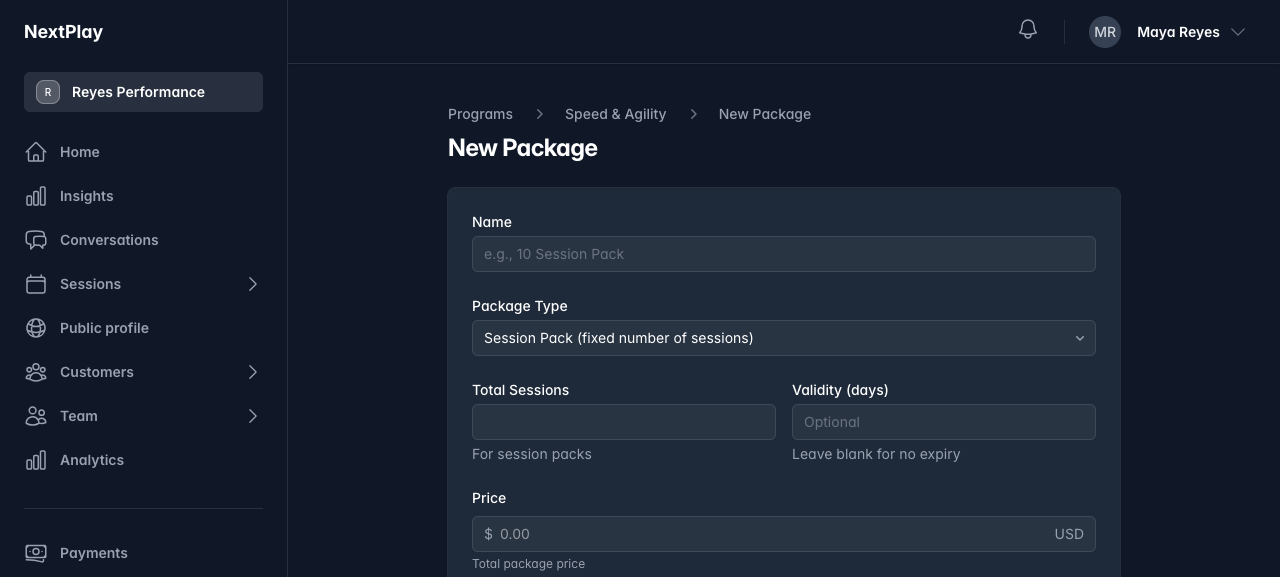
- Session Pack is a fixed number of sessions. Set the Total Sessions and
the Price, and add a Validity (days) if you want it to expire. - Weekly Recurring is a membership, covered below.
Mark your best option Featured (Most Popular) to make it the first thing
families see. It shows with a “Most Popular” label.
Offer a membership
A membership bills on a schedule and gives a set number of sessions each week.
Create a package, choose the Weekly Recurring type, then set the Sessions
per week, the Billing Frequency (weekly or monthly), and the Price.
On your page, a family taps Start Membership, chooses who it is for, and
checks out through Stripe. It renews on its own until they cancel.
Add optional extras
Add-ons are paid extras a family can tack on when they book, like equipment
rental. Create an add-on with a Name and a Price ($), and enter 0 for a
free one. Active add-ons show under Optional Add-ons at booking, and the
family checks the ones they want.
Which should you use?
- Just getting started, or running one-offs? A drop-in price is enough.
- Want families to commit and prepay? Sell a package.
- Training the same athletes every week? Run a membership.
You are not locked in. Change a price any time before someone books, and feature
whichever offer fits the season. For how the money reaches you and what the fees
are, see getting paid with Stripe.
Was this helpful?