Your insights, analytics, and payouts
Where to see your upcoming sessions, your org's booking trends, and when payouts land in your bank.
Updated August 17, 2026
Next Play gives you three different views of how your business is doing, and which one you see depends on your role. Here is what each one shows and who can open it.
Your insights
Insights is your own trainer view, open to any trainer in the org. The header reads “Your performance at a glance.” At the top you get four counts:
- Sessions, the total number of sessions you have created
- Published, how many are live
- Upcoming, sessions that have not started yet
- Bookings, your confirmed bookings
Below that, Upcoming Sessions lists your next few sessions with the date and how many spots are booked. Tap View All to jump to your full session list. Recent Bookings sits next to it and shows who signed up most recently, with a status badge for each one.
Organization analytics
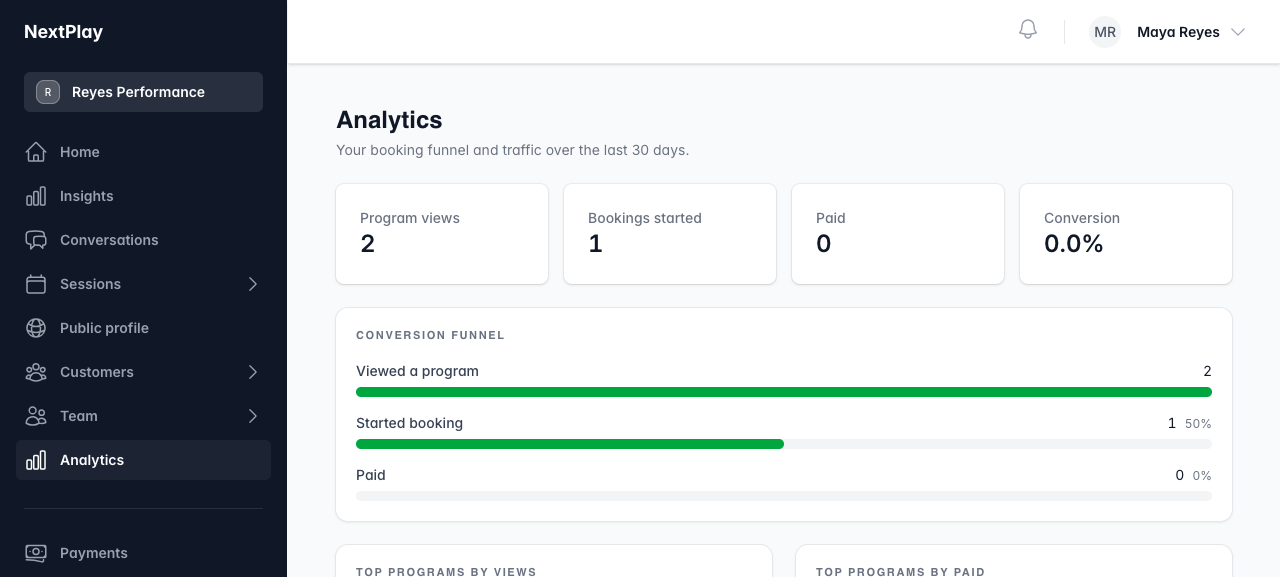
Analytics is for org admins and owners. It covers the whole organization over the last 30 days, not just your own sessions. The page opens with four headline numbers:
- Program views, how many people looked at a program
- Bookings started, how many began checkout
- Paid, how many finished paying
- Conversion, the share of views that turned into a paid booking
Under those you get a Conversion funnel showing where people drop off, ranked lists like Top programs by views, Top programs by paid, Top referrers, and Devices, plus a Signups (last 30 days) trend line.
Revenue and payouts
The Revenue Dashboard is owner only. It is the money view, described as an “Overview of your organization’s financial performance,” with four totals across the top:
- Total Revenue
- Total Refunded
- Net Revenue
- Successful Payments
Recent Payments lists your latest successful transactions, each with the customer and amount. Use View All Payments to see the full history.
To see when money actually lands, look at Pending Payouts, the funds in transit to your bank. Each payout shows its amount, an expected arrival date, and the last four digits of the destination account. The Open Disputes section flags any payments a customer has challenged, with the amount and when evidence is due.
Was this helpful?